728x90
Theory Notion (wsl 설정 여기서 보기)
230524 딥러닝 심화(3)
API
autumn-pin-f14.notion.site
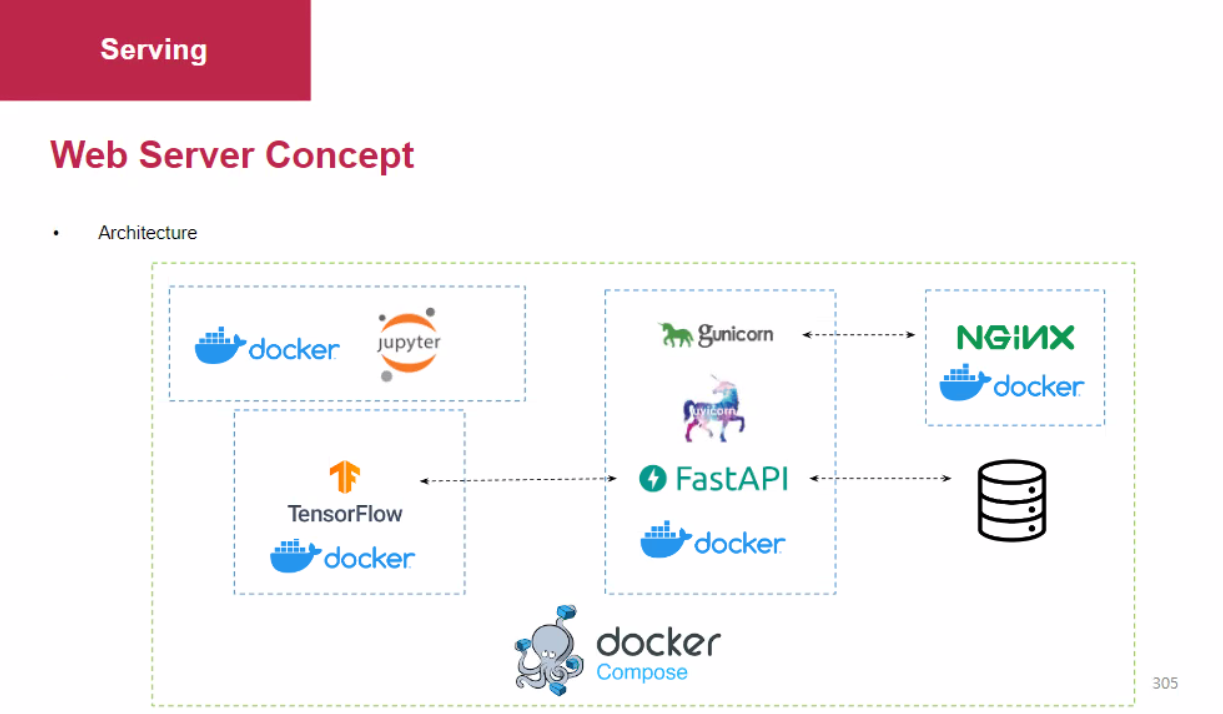
기본 구조
1. WSL
- docker pull python:3.8 (이미지 내려받기)
- mkdir workspace (폴더 만들기)
- cd workspace (폴더로 이동)
- mkdir jupyter-app
- cd jupyter-app
※ 참고: cd ../ (상위폴더가기)
- nano Dockerfile
- 안에 들어갈 내용
FROM tensorflow/tensorflow
WORKDIR /workspace
COPY . /workspace
RUN pip install -r requirements.txt
EXPOSE 8888
CMD ["jupyter", "notebook", "--ip", "0.0.0.0", "--port", "8888", "--allow-root", "--NotebookApp.token='password'"]
- 컨트롤 + o 저장하고 / 엔터
- 컨트롤 + x 나간다
- nano requirements.txt
- 안에 들어갈 내용
- jupyter
- 도커 빌드 (이미지 만들기)
- docker build -t jupyter-app .
- docker run (컨테이너 실행)
- docker run -d -p 8888:8888 -v $(pwd):/workspace --name jupyter-app-container -t jupyter-app
workspace 가서 주소창 가고
거기서 cmd 엔터하면 cmd 열리고
code .
하면 비쥬얼 스튜디오 열림
반대로 비쥬얼 상에서
컨 + 쉬프트 + c
하면 파워쉘 뜸
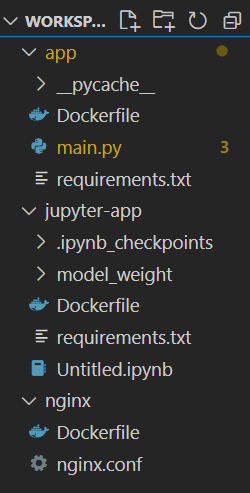
- jupyter-app : 모델 만들기
- app : WAS
- nginx : 웹서버
2. jupyter-app폴더 (모델 만들기)
2.1. Dockerfile
FROM tensorflow/tensorflow
WORKDIR /workspace
COPY . /workspace
RUN pip install -r requirements.txt
EXPOSE 8888
CMD ["jupyter", "notebook", "--ip", "0.0.0.0", "--port", "8888", "--allow-root", "--NotebookApp.token='password'"]
2.2. Untitled.ipynb
모델 fit 하고
그 다음에 밑에 코드
saved_model_path = "./model_weight"
mkdir_p(saved_model_path)
saved_model_path = "./model_weight/1"
mkdir_p(saved_model_path)
tf.keras.models.save_model(
model,
saved_model_path,
overwrite=True,
include_optimizer=True,
)
# 모델파일들이 여기 저장되어있음
!ls -al ./model_weight/1
여기까지가 도커 - 쥬피터 그림
아래부터 텐서플로우
도커
import requests
import json
# 반응함, 임의의 숫자 입력하면 오류 발생(IP주소 값이 존재하지 않을 때)
# 404 : Not fonud error
ADDRESS = "172.17.0.3"
PREDICT_URL = "v1/models/fashion_model:predict"
HEADERS = {"content-type": "application/json"}
requests.get(f"http://{ADDRESS}:8501")
def set_data_format(infer_data):
return json.dumps({
"signature_name" : "serving_default",
"instances" : infer_data
})
infer_data = x_test[:3].tolist()
# 400 요청사항 리턴 못함
# 상세한 원인 출력
result = requests.post(
f"http://{ADDRESS}:8501/{PREDICT_URL}",
data = set_data_format(infer_data),
headers = HEADERS)
json.loads(result.text)
# 실제 값과 맞는지 확인하기
import numpy as np
result_dict = json.loads(result.text)
cnt = 0
sum([1 if y_test[i] == np.argmax(result_dict['predictions'][i]) else 0 for i in range(3)]) /3
# for elem in result['predictions']
### 이제 백엔드
import requests
import json
ADDRESS = "172.17.0.4"
# ADDRESS = "localhost" -> 172.17.0.2
result = requests.get(f"http://{ADDRESS}:8000/test")
json.loads(result.text)
data = json.dumps({
"name":"test",
# "description":"this is a description"
"description":3481574591
})
# 포스트방식으로 요청하기
result = requests.post(
f"http://{ADDRESS}:8000/items",
data=data,
headers=HEADERS,
)
json.loads(result.text)
2.3. requirements.txt
jupyter
3. app
3.1. Dockerfile
FROM python:3.8
WORKDIR /workspace
COPY . /workspace
RUN pip install -r requirements.txt
CMD ["bash"]
# CMD ["python", "main.py"]
3.2. main.py
from fastapi import FastAPI
from pydantic import BaseModel
import uvicorn
# FastAPI 애플리케이션 객체를 생성하고 app 변수에 할당합니다.
app = FastAPI()
# main() 함수를 정의합니다.
# 이 함수는 FastAPI 애플리케이션을 실행하기 위해 Uvicorn 서버를 실행합니다.
# uvicorn.run() 함수에는
# FastAPI 애플리케이션 객체, 호스트 주소, 포트 번호,
# 코드 변경 시 자동 재로딩 여부, 워커 프로세스 수 등이 설정됩니다.
def main():
uvicorn.run(
app="main:app",
host="0.0.0.0",
port=8000,
reload=True,
workers=1,
)
# Pydantic을 사용하여 데이터 모델인 Item 클래스를 정의합니다.
# POST 요청의 데이터 형식을 정의합니다.
class Item(BaseModel):
name: str
description: str
# 이건 get방식 test
# http://localhost:8000/test 으로 요청하면 Hello World! 출력
@app.get("/test")
async def test():
return "Hello World!"
# @app.post("/items") 데코레이터를 사용하여
# "/items" 경로에 대한 POST 요청을 처리하는 핸들러 함수인 return_item을 정의합니다.
# 이 함수는 item이라는 Item 모델 객체를 매개변수로 받습니다.
# 함수는 받은 item을 출력하고 동일한 item을 응답으로 반환합니다.
@app.post("/items")
async def return_item(item: Item):
print("Request Received, data: ", item)
return item
# __name__ == "__main__" 조건을 사용하여
# 스크립트가 직접 실행될 때만 main() 함수가 실행되도록 합니다.
if __name__ == "__main__":
main()
# 위의 코드를 실행하면 FastAPI 서버가 http://localhost:8000 주소에서 실행되며,
# "/items" 경로에 POST 요청을 보낼 수 있습니다.
# 요청 본문에는 "name"과 "description" 필드를 포함하는 JSON 형식의 데이터를 보내야 합니다.
# 서버는 받은 데이터를 출력하고 동일한 데이터를 응답으로 반환합니다.
3.3. requirements.txt
fastapi
uvicorn[standard]
requests
4. nginx
4.1. Dockerfile
FROM nginx:1.19.0-alpine
RUN rm /etc/nginx/conf.d/default.conf
COPY nginx.conf /etc/nginx/nginx.conf
4.2. nginx.conf
user nginx;
worker_processes auto;
pid /var/run/nginx.pid;
events {
worker_connections 1024;
}
http {
access_log /var/log/nginx/access.log;
error_log /var/log/nginx/error.log;
include /etc/nginx/mime.types;
default_type application/octet-stream;
server {
listen 80;
server_name 0.0.0.0;
location / {
proxy_pass http://172.17.0.4:8000/; # 또는 app-server:8000
proxy_redirect off;
proxy_set_header Host $host;
proxy_set_header X-Real-IP $remote_addr;
proxy_set_header X-Forwarded-For $proxy_add_x_forwarded_for;
}
sendfile on;
keepalive_timeout 65;
include /etc/nginx/conf.d/*.conf;
}
}
728x90
'#02.천재교육 빅데이터 > +14.딥러닝_심화' 카테고리의 다른 글
| 230523 CNN, Lightening (0) | 2023.05.23 |
|---|---|
| 230522 Keras Sequential -> Functional type (0) | 2023.05.22 |
