회귀 (Regression)
- 회귀는 현대 통계학을 이루는 큰 축
- 회귀 분석은 유전적 특성을 연구하던 영국의 통계학자 갈톤(Galton)이 수행한 연구에서 유래했다는 것이 일반론
“부모의 키가 크더라도 자식의 키가 대를 이어 무한정 커지지 않으며,
부모의 키가 작더라도 대를 이어 자식의 키가 무한정 작아지지 않는다.”
- 회귀분석은 이처럼 데이터 값이 평균과 같은 일정한 값으로 돌아가려는 경향을 이용한 통계학 기법.
회귀는 여러 개의 독립변수와 한 개의 종속변수 간의 상관관계를 모델링하는 기법을 통칭.
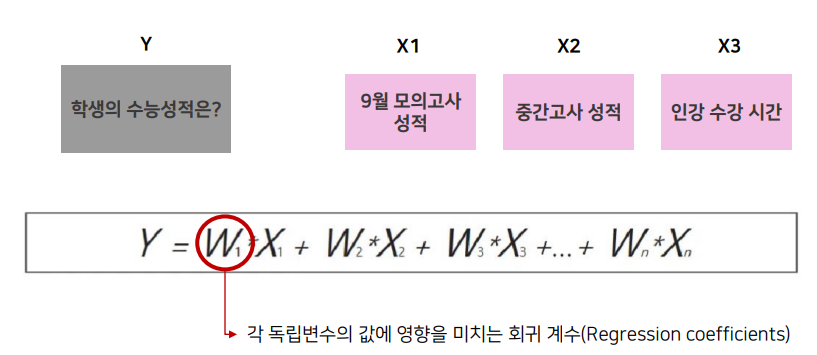
머신러닝 회귀 예측의 핵심은 주어진 피쳐와 결정 값 데이터 기반에서 학습을 통해 최적의 회귀 계수를 찾아내는 것.
회귀의 유형
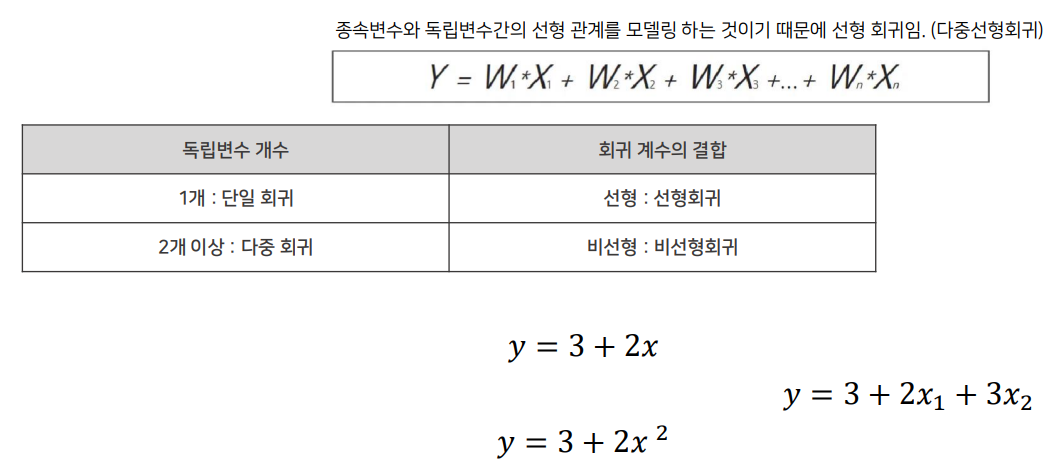
- 위 이미지에서 y = 3 + 2x 가 선형회귀이고, y = 3 + 2x제곱이 비선형회귀.
선형회귀는 한 방향의 증감형을 보이고, 비선형회귀는 물결, u 자 모양 등 다양하다. 즉, 선형이 아니다.
선형회귀
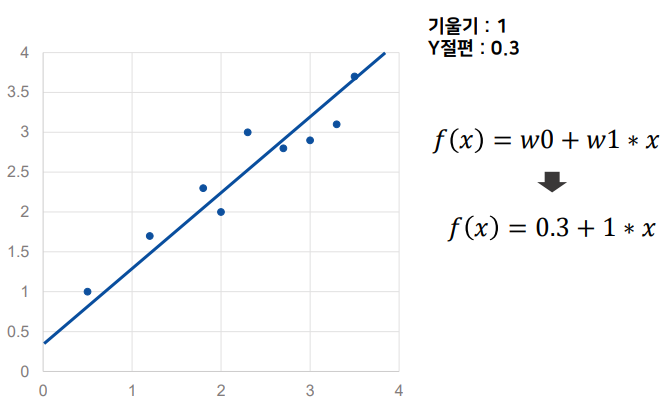
- f(x) = 0.3 + 1 * x
<파라미터>
y절편 0.3 ⇒ 편향
기울기 1 ⇒ 가중치
- 위 그래프를 식으로 나타내면 y = 0.3 + 1x
y절편이 0.3 이고 기울기가 1 이라는 의미를 잘 생각해봐.
처음 시작부터 0.3 위치에 더해져 있고, x가 1 증가하때 y도 그만큼 증가한다는 의미.
- 최적의 회귀모델을 만든다는 것 : 전체 데이터의 잔차(오류값)합이 최소가 되는 모델을 만든다는 의미

MSE (평균 제곱 오차)
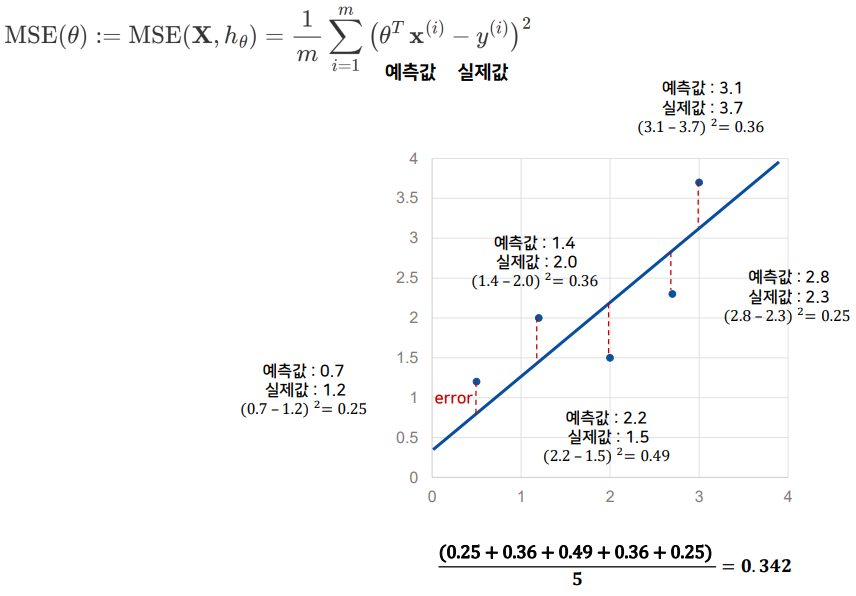
- (예측값 - 실제값)을 제곱해서 평균을 내겠다!
- 모델의 오차를 계산하겠다는 의미. (= 선에서 데이터들이 얼마나 떨어져있나)
당연히 클수록 안좋겠지
- MSE가 최소가 되도록 하는 파라미터를 찾는 것이 최종 목표!
HOW ?
A. 정규방적식 또는 특이값 분해 (SVD)
B. 경사하강법
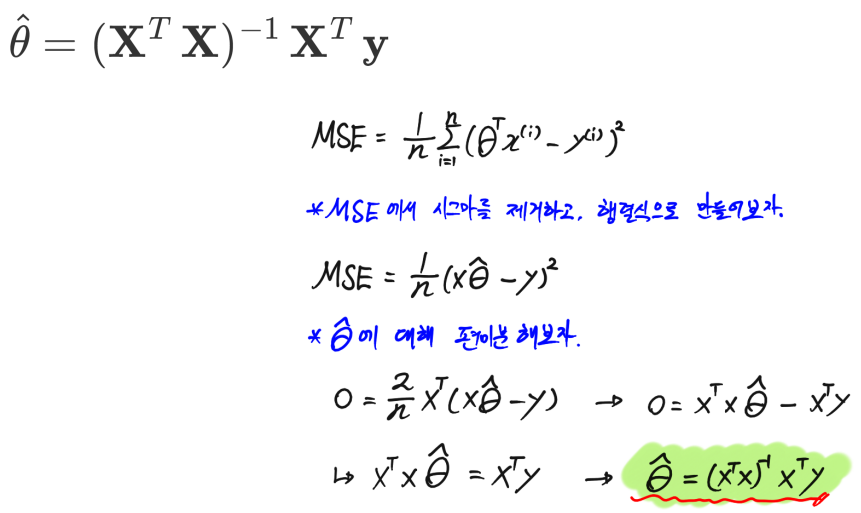
MSE가 최소가 되도록 하는 파라미터를 찾는 방법 [정규 방정식 / SVD(특이값 분해)]
1. 정규방정식
2. 특이값 분해 (SVD)
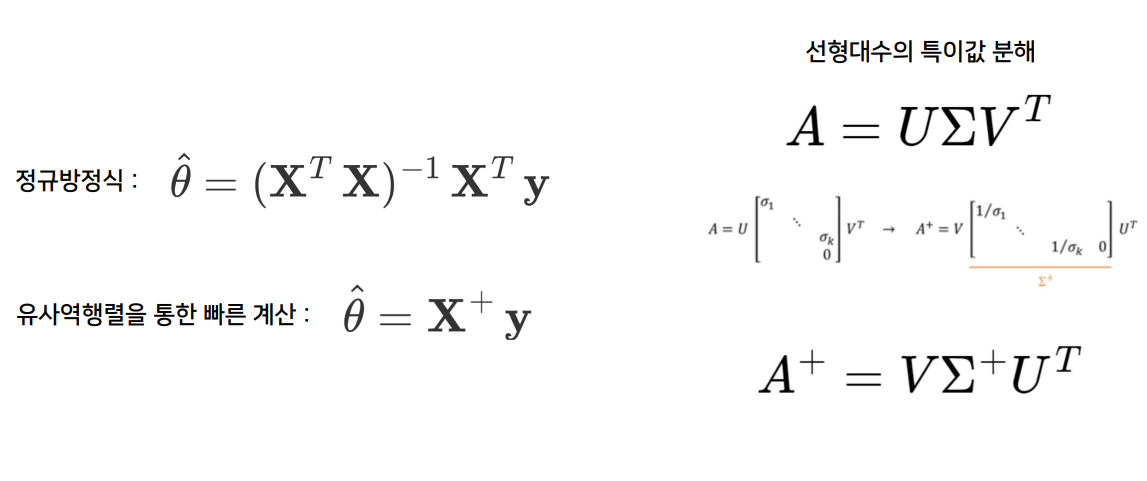
※ 정규방정식에서 안되는게 특이값 분해에서는 된다.
3. 사이킷런 - Linear Regression (선형회귀모델)

- 사이킷런에서는 최적의 파라미터를 계산하는 선형회귀 모델을 제공한다.
4. 경사하강법
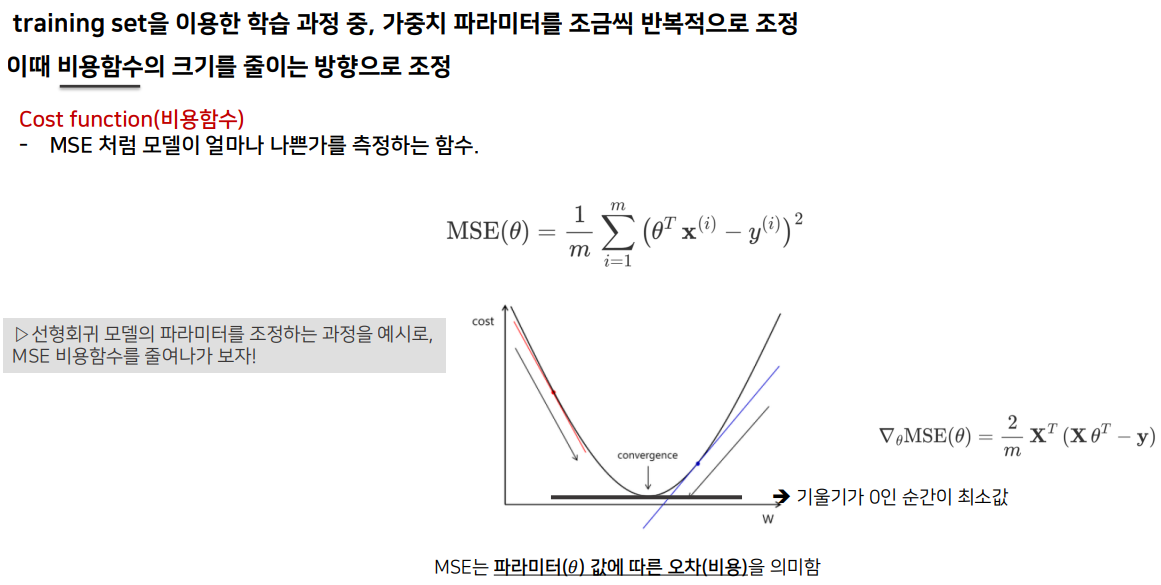
mse 를 미분해서 기울기가 0에 제일 가까운 것을 찾으면 그게 mse가 최소인값
학습스텝 = 학습률
이걸 어떻게 설정하느냐에 따라 모델의 성능이 달라진다
※ 경사하강법의 진행과정
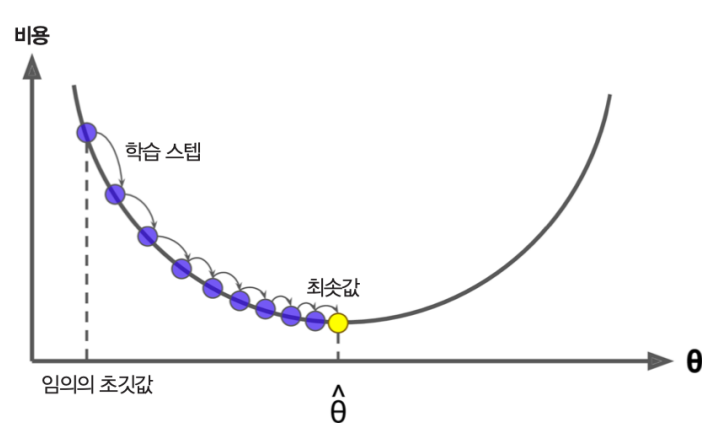
※ 경사하강법의 주의사항
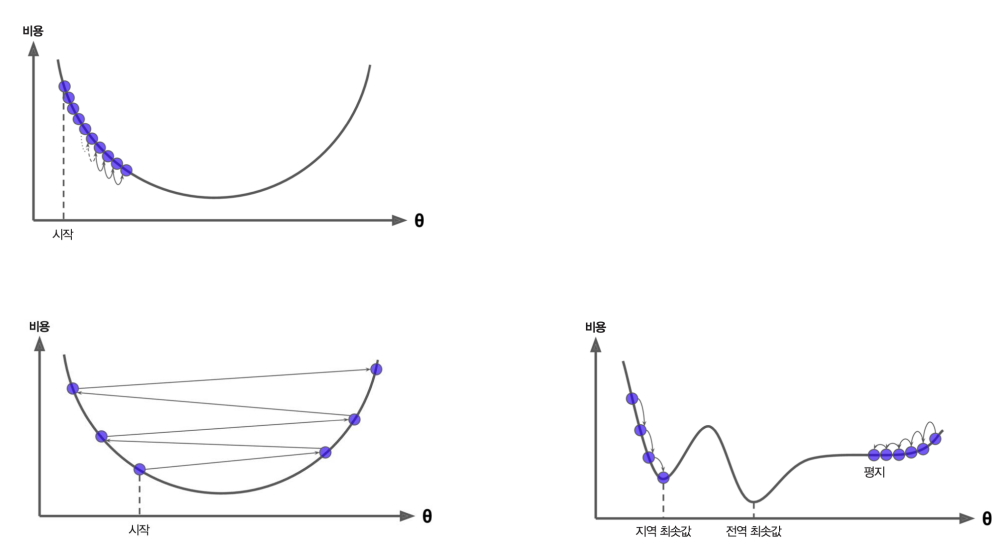
- 비용함수가 3차곡선 이상일 경우 한 곡선구간에서의 최소값을 최소라 착각 (지역최솟값)
평지에서 멈출 가능성도 있고.
※ 경사하강법의 종류
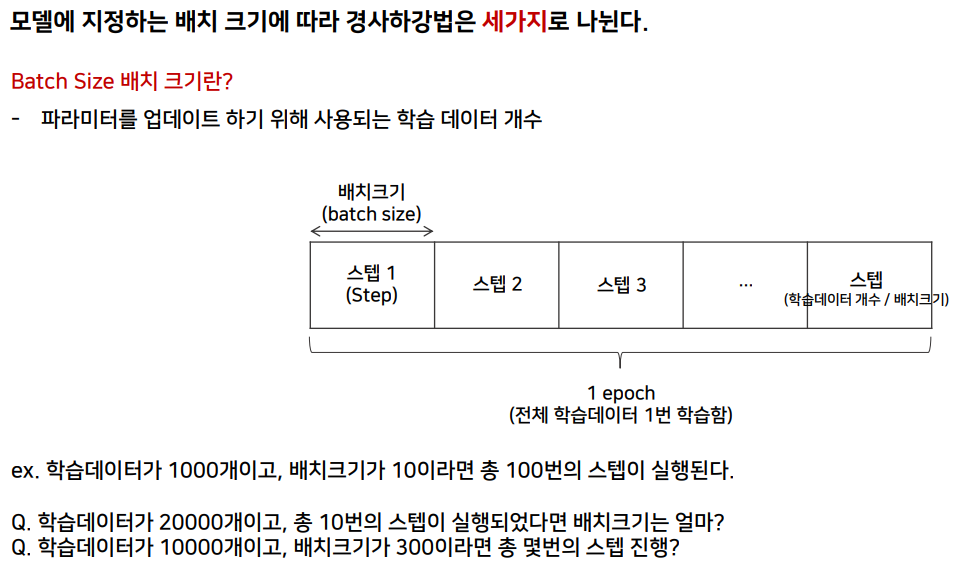
- 마지막 Q 답은 34번스텝 진행. (33번의 스텝은 300개씩, 마지막 스텝은 100개만 보면 되겠지)
4.1. 배치 경사하강법
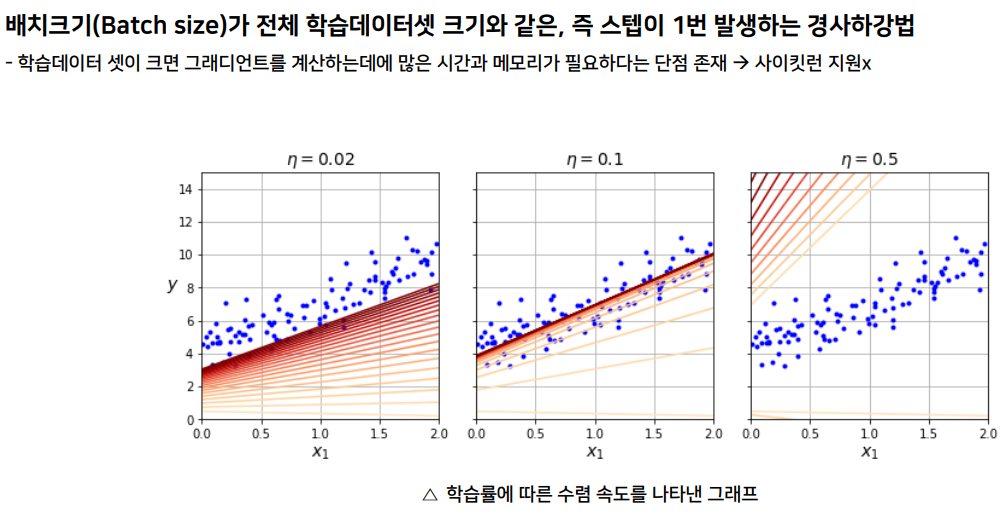
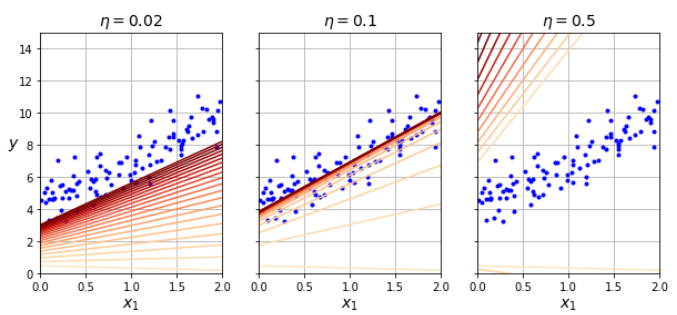
- n = 0.5 학습률이 가장 크다
최적의 학습률은 가운데
4.2. 확률적 경사하강법 (SGD)
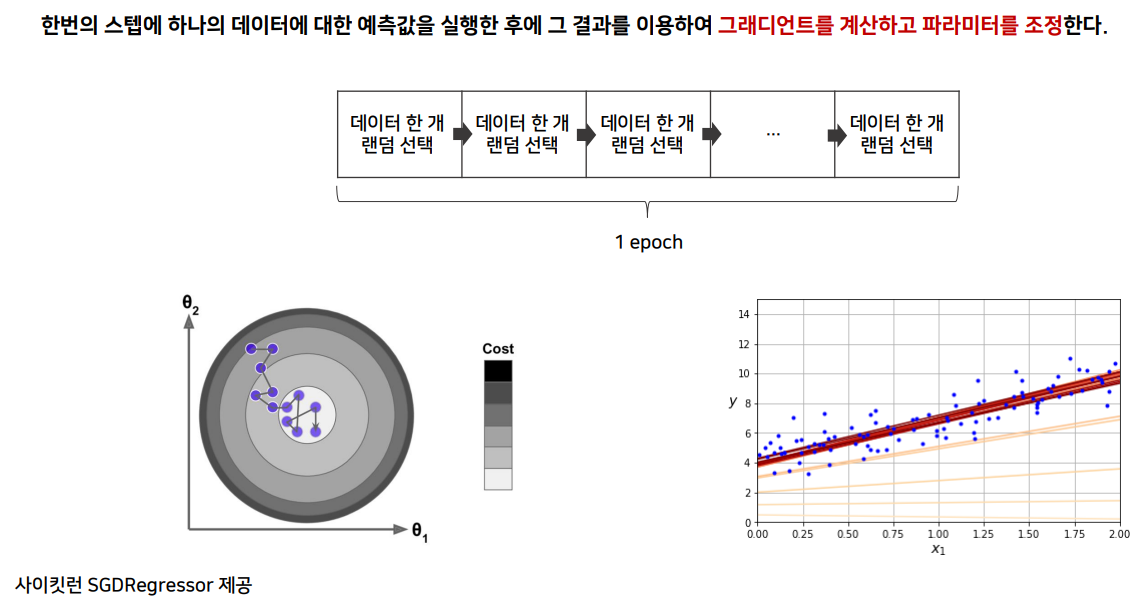
- 계산량이 적어서 큰데이터셋에도 유용 (한스텝에 한데이터만 하니께)
지역최소값에 도달할 가능성이 적어진다.
4.3. 미니 배치 경사하강법
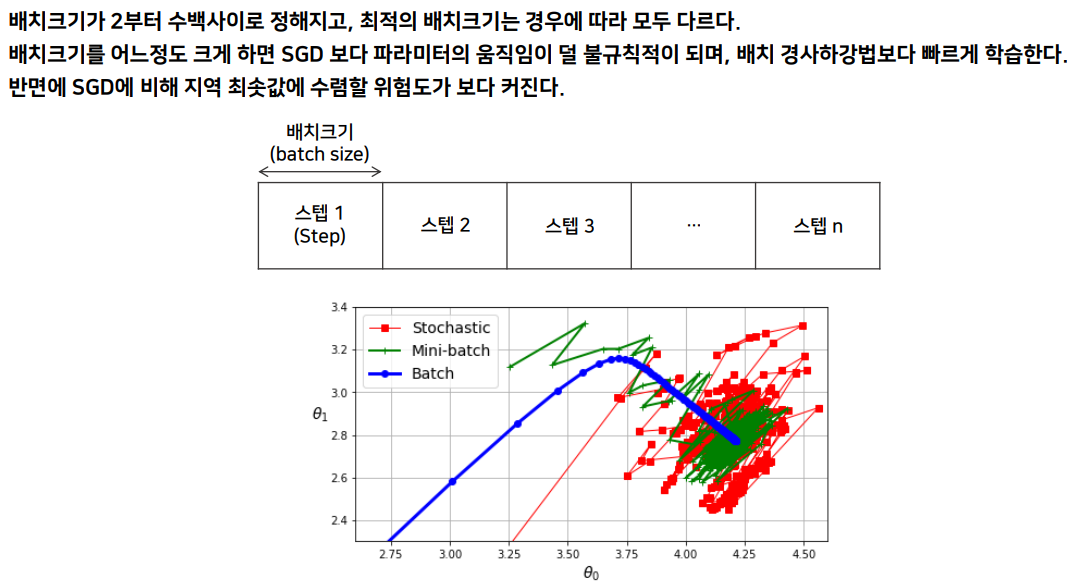
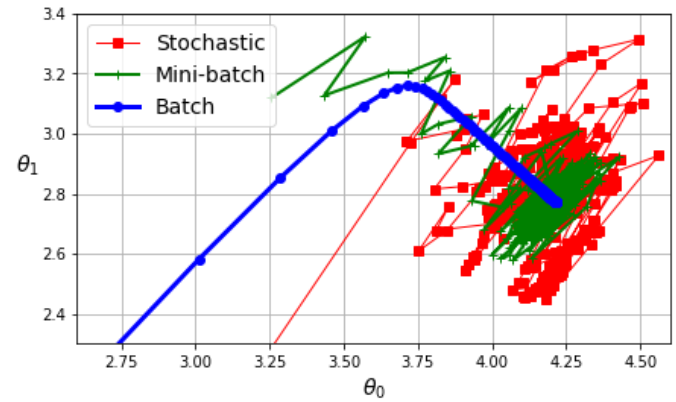
- 빨간색이 확률적 경사하강법
녹색이 미니배치
4.4. 학습 스케쥴 (Learning schedule)
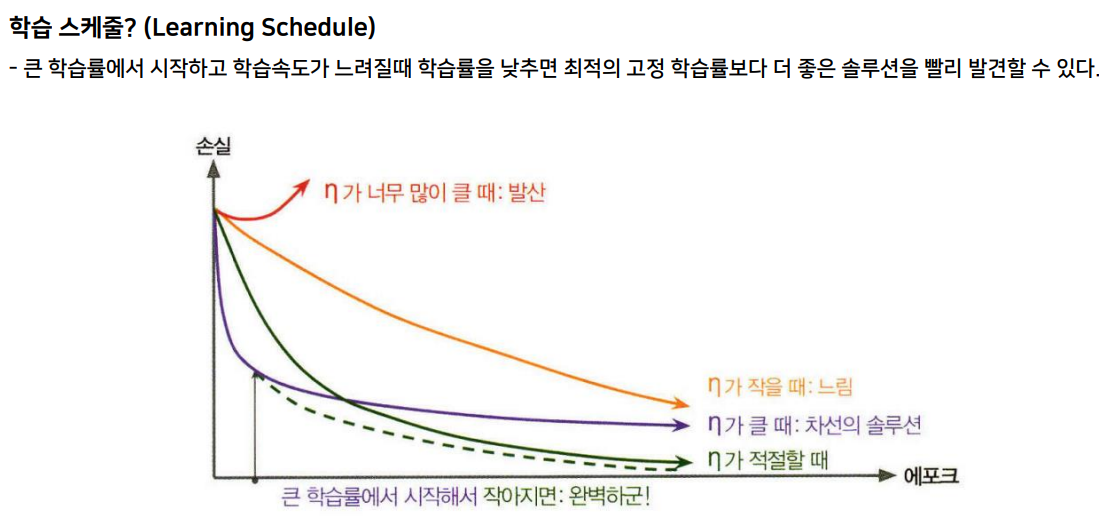
- 처음에는 파라미터들이 크게 업데이트되다가
기울기가 줄어드는 비율이 작아질때 파라미터를 줄인다.
= 학습속도가 느려질때 학습률을 낮춘다.
선형회귀 실습
import sklearn
assert sklearn.__version__ >= "1.0.1"
import matplotlib.pyplot as plt
plt.rc('font', size=14)
plt.rc('axes', labelsize=14, titlesize=14)
plt.rc('legend', fontsize=14)
plt.rc('xtick', labelsize=10)
plt.rc('ytick', labelsize=10)
import numpy as np
np.random.seed(42) # 무작위성 지정
m = 100 # 데이터셋 크기
X = 2 * np.random.rand(m, 1) # 입력 데이터셋: 0에서 2 사이의 임의의 값 100개.
y = 4 + 3 * X + np.random.randn(m, 1) # y = 4 + 3*X 함수를 이용한 타깃값 생성. 잡음 추가됨.
import matplotlib.pyplot as plt
plt.figure(figsize=(6, 4))
plt.plot(X, y, "b.")
plt.xlabel("$x_1$")
plt.ylabel("$y$", rotation=0)
plt.axis([0, 2, 0, 15])
plt.grid()
plt.show()
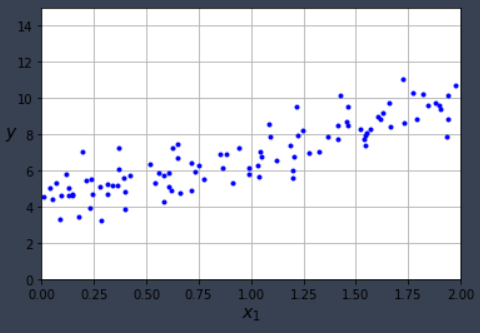
=>
※ 데이터를 산점도로 그리면 잡음 때문에 일직선이 아닌 선형적으로 퍼져 있는 데이터를 볼 수 있다.
이제 MSE(평균제곱오차) 가 최소가 되는 파라미터(Y절편, 기울기)를 찾아보자!
A. 정규방적식 또는 특이값 분해 (SVD)
B. 사이킷런 - Linear Regression (선형회귀모델)
C. 경사하강법
위 세가지 방법 중 먼저 정규방정식이다.
1. 정규방정식
from sklearn.preprocessing import add_dummy_feature
X_b = add_dummy_feature(X) # 절편과의 곱을 위해 필요한 1 추가
theta_best = np.linalg.inv(X_b.T @ X_b) @ X_b.T @ y
theta_best
=>
array([[4.21509616],
[2.77011339]])
X_new = np.array([[0], [2]])
X_new_b = add_dummy_feature(X_new) # 절편과의 곱을 위한 1 추가.
y_predict = X_new_b @ theta_best
y_predict
=>
array([[4.21509616],
[9.75532293]])
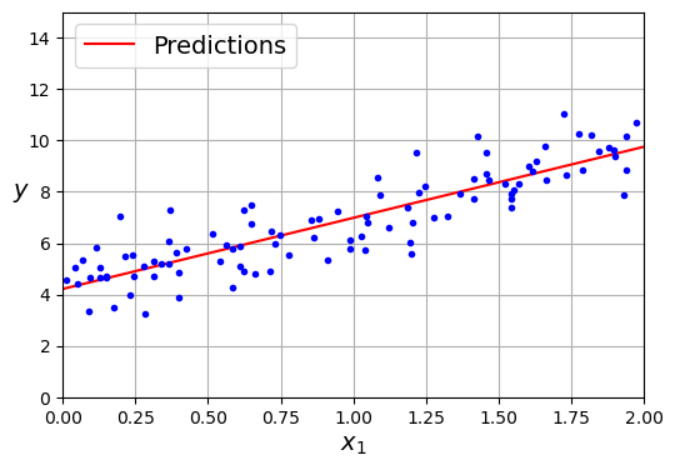
import matplotlib.pyplot as plt
plt.figure(figsize=(6, 4)) # extra code – not needed, just formatting
plt.plot(X_new, y_predict, "r-", label="Predictions")
plt.plot(X, y, "b.")
# extra code – beautifies and saves Figure 4–2
plt.xlabel("$x_1$")
plt.ylabel("$y$", rotation=0)
plt.axis([0, 2, 0, 15])
plt.grid()
plt.legend(loc="upper left")
plt.show()
2. 사이킷런 - Linear Regression (선형회귀모델)
from sklearn.linear_model import LinearRegression
lin_reg = LinearRegression()
lin_reg.fit(X, y)
# 절편과 기울기 구하기
lin_reg.intercept_, lin_reg.coef_
=>
(array([4.21509616]), array([[2.77011339]]))
lin_reg.predict(X_new)
=>
array([[4.21509616],
[9.75532293]])
3. 경사하강법
선형 회귀 모델과 경사 하강법
3.1. 배치 경사 하강법
# 아래 코드는 선형 회귀 모델에 대해 적용하는 배치 경사 하강법을 순수 파이썬 코드로 구현한다.
eta = 0.1 # 학습률
n_epochs = 1000 # 에포크 수
m = len(X_b) # 훈련셋 크기
np.random.seed(42)
theta = np.random.randn(2, 1) # 임의로 초기화된 파라미터. (2, 1) 모양의 어레이
for epoch in range(n_epochs): # 에포크 수만큼 반복
gradients = 2 / m * X_b.T @ (X_b @ theta - y) # MSE의 그레이디언트(기울기)
theta = theta - eta * gradients # theta(파라미터) 는 에포크가 반복될때마다 업데이트
theta
=>
array([[4.21509616],
[2.77011339]])
※ 학습률과 경사 하강법의 관계
아래 코드는 학습률에 따라 파라미터의 수렴 여부와 속도가 달라짐을 보여준다.
import matplotlib as mpl
# 아래 그래프를 그리는 함수
# 학습률이 지정되었을 때, 파라미터 수렴 과정을 직선의 수렴과정으로 그림.
def plot_gradient_descent(theta, eta):
m = len(X_b)
plt.plot(X, y, "b.")
n_epochs = 1000 # 에포크 수
n_shown = 20 # 아래 그래프에서 보이는 20개의 그래프 그리기 용도
theta_path = [] # 훈련 과정동안 업데이트 되는 파라미터 수렴 과정 확인 용도
# 경사 하강법 1000번 반복
for epoch in range(n_epochs):
# 첫 20개의 파라미터 업데이트 확인용 직선 그리기
if epoch < n_shown:
y_predict = X_new_b @ theta
color = mpl.colors.rgb2hex(plt.cm.OrRd(epoch / n_shown + 0.15))
plt.plot(X_new, y_predict, linestyle="solid", color=color)
# 경사 하강법
gradients = 2 / m * X_b.T @ (X_b @ theta - y)
theta = theta - eta * gradients
# 학습된 파라미터 저장
theta_path.append(theta)
plt.xlabel("$x_1$")
plt.axis([0, 2, 0, 15])
plt.grid()
plt.title(fr"$\eta = {eta}$")
return theta_path # 저장된 파라미터 어레이 반환
np.random.seed(42)
theta = np.random.randn(2, 1) # 파라미터 무작위 초기화
plt.figure(figsize=(10, 4))
# 학습률: 0.02
plt.subplot(131)
plot_gradient_descent(theta, eta=0.02)
plt.ylabel("$y$", rotation=0)
# 학습률: 0.1
plt.subplot(132)
theta_path_bgd = plot_gradient_descent(theta, eta=0.1) # 반환값은 이어지는 그래프에서 활용됨.
plt.gca().axes.yaxis.set_ticklabels([])
# 학습률: 0.5
plt.subplot(133)
plt.gca().axes.yaxis.set_ticklabels([])
plot_gradient_descent(theta, eta=0.5)
plt.show()
3.2. 확률적 경사 하강법
사이킷런의 SGDRegressor 클래스
from sklearn.linear_model import SGDRegressor
sgd_reg = SGDRegressor(max_iter=1000, tol=1e-5, penalty=None, eta0=0.01,
n_iter_no_change=100, random_state=42)
sgd_reg.fit(X, y.ravel()) # y.ravel(): 타깃값을 1차원 어레로 변환
X
=>
array([[0.74908024],
[1.90142861],
[1.46398788],
[1.19731697], ....
y.ravel()
=>
array([ 6.33428778, 9.40527849, 8.48372443, 5.60438199, 4.71643995,
5.29307969, 5.82639572, 8.67878666, 6.79819647, 7.74667842, ....
sgd_reg.fit(X, y.ravel())
=>
SGDRegressor(n_iter_no_change=100, penalty=None, random_state=42, tol=1e-05)
In a Jupyter environment, please rerun this cell to show the HTML representation or trust the notebook.
On GitHub, the HTML representation is unable to render, please try loading this page with nbviewer.org.
sgd_reg.intercept_, sgd_reg.coef_
sgd_reg.intercept_ # 배치 : 4.21509616
=>
array([4.21278812])
sgd_reg.coef_ # 배치 : 2.77011339
=>
array([2.77270267])
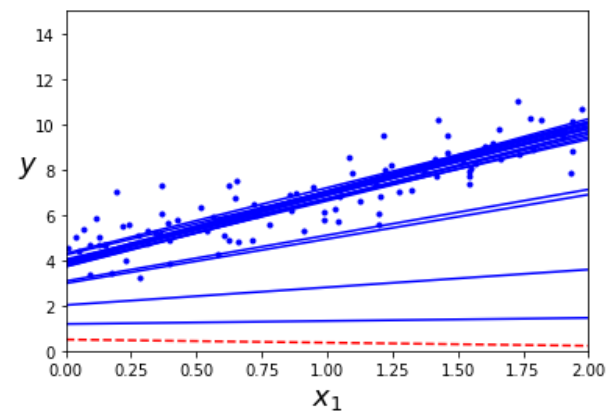
직접구현
theta_path_sgd = []
m = len(X_b)
np.random.seed(42)
n_epochs = 50 # 에포크 수
t0, t1 = 5, 50 # 학습 스케줄 하이퍼파라미터
def learning_schedule(t):
return t0 / (t + t1)
theta = np.random.randn(2,1) # 파라미터 랜덤 초기화
for epoch in range(n_epochs):
# 매 샘플에 대해 그레이디언트 계산 후 파라미터 업데이트
for i in range(m):
# 처음 20번 선형 모델(직선) 그리기
if epoch == 0 and i < 20:
y_predict = X_new_b.dot(theta)
style = "b-" if i > 0 else "r--"
plt.plot(X_new, y_predict, style)
# 파라미터 업데이트
random_index = np.random.randint(m)
xi = X_b[random_index:random_index+1]
yi = y[random_index:random_index+1]
gradients = 2 * xi.T.dot(xi.dot(theta) - yi) # 하나의 샘플에 대한 그레이디언트 계산
eta = learning_schedule(epoch * m + i) # 학습 스케쥴을 이용한 학습률 조정
theta = theta - eta * gradients
theta_path_sgd.append(theta)
plt.plot(X, y, "b.")
plt.xlabel("$x_1$", fontsize=18)
plt.ylabel("$y$", rotation=0, fontsize=18)
plt.axis([0, 2, 0, 15])
plt.show()
theta
=>
array([[4.21076011],
[2.74856079]])
3.3. 미니 배치 경사 하강법
from math import ceil
n_epochs = 50 # 에포크 수
minibatch_size = 20 # 미니 배치 크기
n_batches_per_epoch = ceil(m / minibatch_size)
# 스텝 수 10000 --> 배치크기 300개 --> 스텝수 33 x 34 33.xxx --> ceil 34
np.random.seed(42)
theta = np.random.randn(2, 1) # 파라미터 무작위 초기화
# 학습 스케줄
t0, t1 = 200, 1000
def learning_schedule(t):
return t0 / (t + t1)
# 미니 배치의 파라미터 수렴 과정
theta_path_mgd = []
# 미니 배치 경사 하강법 훈련
for epoch in range(n_epochs):
# 무작위 섞기 : 한번의 스텝에서 20개의 데이터셋
shuffled_indices = np.random.permutation(m)
X_b_shuffled = X_b[shuffled_indices]
y_shuffled = y[shuffled_indices]
# 미니 배치 경사 하강법 반복
for iteration in range(0, n_batches_per_epoch): # 스텝 횟수
idx = iteration * minibatch_size
xi = X_b_shuffled[idx : idx + minibatch_size] # 미니 배치 묶음 20개
yi = y_shuffled[idx : idx + minibatch_size] # 20개
gradients = 2 / minibatch_size * xi.T @ (xi @ theta - yi) # 그레이디언트
eta = learning_schedule(iteration)
theta = theta - eta * gradients # 파라미터를 업데이트
theta_path_mgd.append(theta)
경사 하강법 비교
# 아래 그래프 그리기
# 세 종류의 경사 하강법에서 파라미터가 수렴하는 과정을 보여줌.
theta_path_bgd = np.array(theta_path_bgd)
theta_path_sgd = np.array(theta_path_sgd)
theta_path_mgd = np.array(theta_path_mgd)
plt.figure(figsize=(7, 4))
plt.plot(theta_path_sgd[:, 0], theta_path_sgd[:, 1], "r-s", linewidth=1,
label="Stochastic")
plt.plot(theta_path_mgd[:, 0], theta_path_mgd[:, 1], "g-+", linewidth=2,
label="Mini-batch")
plt.plot(theta_path_bgd[:, 0], theta_path_bgd[:, 1], "b-o", linewidth=3,
label="Batch")
plt.legend(loc="upper left")
plt.xlabel(r"$\theta_0$")
plt.ylabel(r"$\theta_1$ ", rotation=0)
plt.axis([2.6, 4.6, 2.3, 3.4])
plt.grid()
plt.show()

'#02.천재교육 빅데이터 > +06.머신러닝 기초' 카테고리의 다른 글
| [천재교육] 로지스틱 회귀, 소프트맥스 회귀 (0) | 2023.03.15 |
|---|---|
| [천재교육] 다항회귀, 학습곡선(Learning Curve) (0) | 2023.03.15 |
| [천재교육] 결정트리시각화, 배깅, 랜덤포레스트 부스팅 실전 (0) | 2023.03.15 |
| [천재교육] 앙상블학습 - 보팅, 배깅(랜덤포레스트), 부스팅, 스태깅 (0) | 2023.03.15 |
| [천재교육] 결정트리, KNN(K-Nearest Neighbor) 알고리즘 (0) | 2023.03.14 |


