일단 캐글에서 개 고양이 이미지 데이터 다운로드, 필요한 라이브러리 import
import os
# 캐글이미지 구글코랩에 다운받기
os.environ['KAGGLE_CONFIG_DIR'] = '/content/'
!kaggle competitions download -c dogs-vs-cats-redux-kernels-edition
# 압축해제
!unzip -q dogs-vs-cats-redux-kernels-edition.zip -d .
!unzip -q train.zip -d .
import tensorflow as tf
import tensorflow.keras as keras
from tensorflow.keras import models
from tensorflow.keras.layers import Conv2D, Flatten, AvgPool2D, Dense, MaxPooling2D, Dropout
import shutil
구글 코랩에서는 폴더를 마우스로 생성하면 분류 디렉토리를 3개로 인식하더라(dogcat, dog, cat)
우리는 개 vs 고양이 분류이니까 2개로 인식해야지.
그러므로 os.mkdir 명령어로 이미지 분류할 폴더 만들기.
그리고 이렇게 폴더를 만들고 사진을 먼저 분류하는 이유는 밑에
tf.keras.preprocessing.image_dataset_from_directory()
이 함수를 쓰기 위해 데이터를 그렇게 분류해야하니까이다.
# 코랩에서는 리눅스 명령어로 폴더 만들기기
os.mkdir('/content/dogcat')
os.mkdir('/content/dogcat/cat')
os.mkdir('/content/dogcat/dog')
# 특정 파일명 포함된 파일 폴더로 분류하기
for i in os.listdir('/content/train/'): # os.listdir => 폴더 안 파일명 읽기
if 'cat' in i:
shutil.copyfile('/content/train/' + i, '/content/dogcat/cat/'+i)
if 'dog' in i:
shutil.copyfile('/content/train/' + i, '/content/dogcat/dog/'+i)
이제 분류된 이미지들을 숫자데이터로 변환하고,
train, val 데이터로 분류하는 작업이 필요하다.
(데이터셋으로 머신러닝 모델 만들 때 train_test_split 작업과 같다고 보면 된다)
일단 이미지를 숫자데이터로 변환하는 작업은
tf.keras.preprocessing.image_dataset_from_directory()
이 고마운 함수에 경로만 잘 적어주면 된다.
대신 이것을 이용하기 전에 데이터가 고양이 폴더, 개 폴더로 나눠져 있어야해서
위에서 shutil 작업을 한 것이고,
tf.keras.preprocessing.image_dataset_from_directory()
이 함수는 텐서플로우에서 쓰는 특별한 자료형인
image_dataset 을 손쉽게 만들어 준다.
이 데이터셋은 train 데이터로 딥러닝 모델에 바로 집어넣을수 있다.
# 이미지를 숫자(픽셀데이터)로 변환하기
# ((이미지 숫자변환데이터), (정답 - 0인지1인지))
train_ds = tf.keras.preprocessing.image_dataset_from_directory(
'/content/dogcat/',
image_size=(64,64), # 이미지 사이즈 이렇게 넣어줘 (픽셀)
batch_size=64, # 이미지 2만장 한번에 안하고 64개씩 학습할게
# 여기까지 하면 ((x값들-64개), (y값들-64)) 이렇게 생성된다.
# 즉, ((이미지 숫자변환데이터), (정답 - 0인지1인지))
subset='training', # 얘는 training 데이터셋이에요. 80% 주세요
validation_split=0.2, # test 데이터 20% 쪼개기
seed=1234
)
# 사실 위 train_ds만 만들고 모델 돌려도 되는데
# 모델성능 점검을 위해 val_ds도 만들자
val_ds = tf.keras.preprocessing.image_dataset_from_directory(
'/content/dogcat/',
image_size=(64,64),
batch_size=64,
subset='validation', # 얘는 validation 데이터셋이에요. 20% 주세요
validation_split=0.2,
seed=1234
)
print(train_ds)
프린트해보니 ((이미지 숫자변환데이터), (정답 - 0인지1인지)) 이렇게 나오네
=> shape=(None, 64, 64, 3), shape=(None,)

오답노트1
위 코드로 train, test 데이터가 나눠지지 않는다 생각해서 아래 코드를 작성해봤다.
위 코드는 그냥 8:2로만 나눠주는 코드인줄 알았다
# x_train, y_train = next(iter(train_ds))
# x_val, y_val = next(iter(val_ds))
# x_train, x_test, y_train, y_test = train_test_split(x_train, y_train, test_size=0.2, random_state=1234)
TypeError: Only integers, slices (`:`), ellipsis (`...`), tf.newaxis (`None`) and scalar tf.int32/tf.int64 tensors are valid indices, got array([18, 45, 55, 36, 13, 25, 57, 63, 10, 7, 27, 14, 17, 46, 31, 35, 1, 42, 62, 2, 39, 48, 60, 0, 11, 3, 61, 34, 37, 59, 9, 16, 5, 28, 58, 44, 51, 43, 30, 26, 41, 23, 49, 15, 24, 52, 12, 53, 38, 19, 47])
# # 위 잘못된 코드로 진행했더니 넘파이 배열이 필요하다떠서 넘파이로 변경했었음
# import numpy as np
# x_train, y_train = np.array(x_train), np.array(y_train)
# x_val, y_val = np.array(x_val), np.array(y_val)
# x_train, x_test, y_train, y_test = train_test_split(x_train, y_train, test_size=0.2, random_state=1234)
고칠점
tf.keras.preprocessing.image_dataset_from_directory
위 모듈에 대한 이해가 더 필요했다.
이제 데이터셋이 준비됐으니 모델을 만들어 보자.
이진분류 모델은
마지막 레이어에 activation='sigmoid',
모델 컴파일에 loss='binary_crossentropy'
이 둘은 보통 같이 쓰인다. 기억하기.
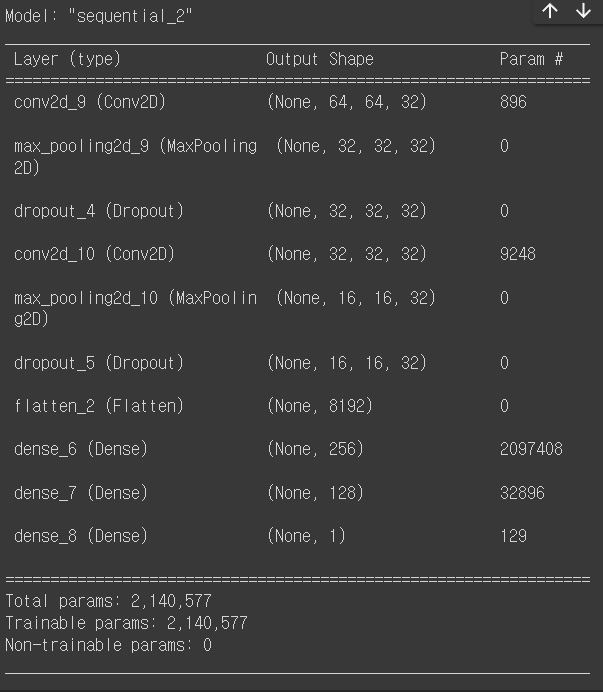
model = tf.keras.models.Sequential([
# 모델에 넣기 전에 증강하기 (과적합 방지가능 / 안해도 됨)
tf.keras.layers.experimental.preprocessing.RandomFlip('horizontal'), # 가로로뒤집기
tf.keras.layers.experimental.preprocessing.RandomRotation(0.1), # 랜덤하게 돌리기
tf.keras.layers.experimental.preprocessing.RandomZoom(0.1), # 랜덤하게 줌
tf.keras.layers.Conv2D(32, (3,3), padding="same", activation='relu', input_shape=(64,64,3) ),
tf.keras.layers.MaxPooling2D( (2,2) ),
tf.keras.layers.Dropout(0.2), # 오버피팅 방지. 위 레이어의 노드 20% 제거함.
tf.keras.layers.Conv2D(32, (3,3), padding="same", activation='relu'),
tf.keras.layers.MaxPooling2D( (2,2) ),
tf.keras.layers.Dropout(0.2),
tf.keras.layers.Flatten(),
tf.keras.layers.Dense(256, activation='relu'),
tf.keras.layers.Dense(128, activation='relu'),
tf.keras.layers.Dense(1, activation='sigmoid'), # 마지막 레이어 1로 바꾸
])
model.compile(loss='binary_crossentropy', optimizer='adam', metrics=['acc'])
model.summary()
# 모델 학습하기
model.fit(train_ds, validation_data = val_ds, epochs=10)
# 학습 후 모델평가하기
score = model.evaluate(val_ds)
print(score)
그런데 이대로 돌리면 acc가 0.5 밖에 안나온다.
왜냐?
전처리를 안했기 때문에.
전처리를 위한 코드(0~1로 압축하기) 를 추가해보자.
import matplotlib.pyplot as plt
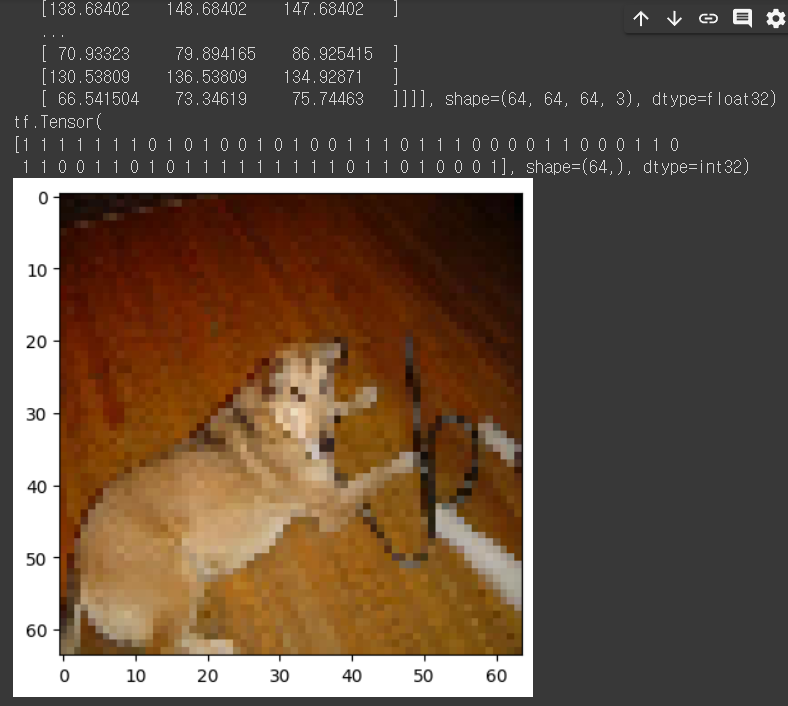
# ((이미지숫자데이터, 정답)) 출력하고 이미지 사진도 출력해보기
for i, 정답 in train_ds.take(1): # 한개의 batch 즉, 이미지 64
print(i)
print(정답)
plt.imshow( i[0].numpy().astype('uint8'))
plt.show()
본격적인 전처리
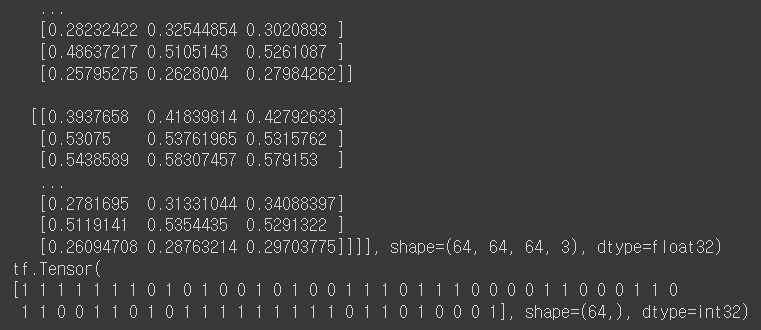
# 인풋데이터 0~1 사이로 압축하기 (전처리)
def 전처리함수(i, 정답): # ((이미지숫자데이터), (정답))
i = tf.cast(i/255.0, tf.float32) # i = i/255 작업을 텐서에서는 cast 쓰면 된다.
return i, 정답 # 변환된 i로 바뀌고, 정답은 그대로
train_ds = train_ds.map(전처리함수) # map(함수) => 데이터셋 데이터 모두에 함수 적용해주세요
val_ds = val_ds.map(전처리함수) # 어떤 함수? => 인풋데이터 전부 255로 나눠주는 전처리함수
# import matplotlib.pyplot as plt
for i, 정답 in train_ds.take(1):
print(i)
print(정답)
# plt.imshow( i[0].numpy().astype('uint8'))
# plt.show()
아래처럼 변환됐다.
이제 다시 모델 돌리면 끝.
느낀점
- 데이터 준비 -> 전처리 -> 모델만들기 -> 학습 후 평가
- 위 순서를 전체적으로 그리고 하나하나 해 나가야겠다.
- 텐서자료형에 대한 이해가 더 필요하다.
- 전처리가 가장 중요한 것 같다.

